Below we describe the steps for VSC or commands in the command line to do specific git things.
Create a new repo
Go to https://
Making your repo locally available
Run git clone <url> in the folder where you want the repo to be.
Protecting main
Create a new branch
In your terminal, run:
git switch -C <branch name>
alternative:
git checkout -b <branch name>
In VSC, go to source control more actions Branch Create Branch.

In the GitHub website, in your repo, click on main and type and click create branch.

This will make a new branch which is not yet locally available. Hence, either one of the two other options is to be preferred.
Push changes
To make your changes available for others, they have to be pushed to GitHub. This is a three-phase action.
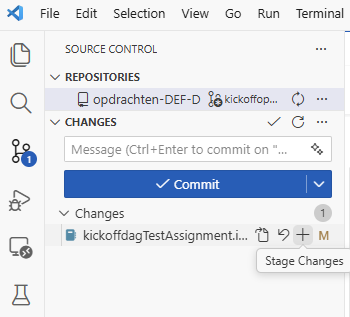
First stage the files you want to commit:
git add. will stage all files. git add <filename> will stage specific files.
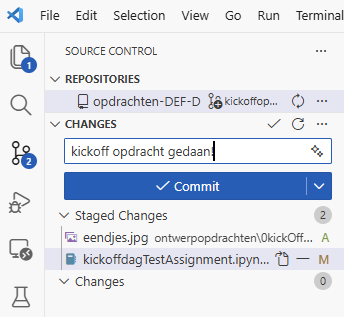
git commit -m "commit message" will make a snapshot of your files and attach a message to that version of the code.
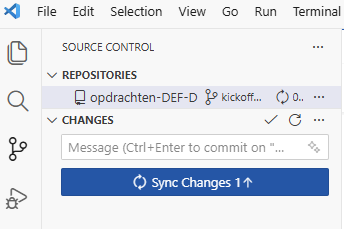
git push will push the commits to GitHub.
``
Add the files you want to commit (staging)
Always enter a commit message
And then push your work to GitHub
Create pull request
Review and merge
Example
Summary
| Command | Description |
|---|---|
git init | Initialises a Git repository in that directory |
git add . | Adds all changes to the staging area to be committed |
git add file_name | Adds changes to the specified file to the staging area to be committed |
git commit | Commits staged changes and allows you to write a commit message |
git switch branch_name | Switches to the specified branch |
git switch -c branch_name | Creates and switches to a new branch |
git switch -d SHA | Checks out a past commit with the given SHA |
git switch SHA file_name | Checks out the past version of a file from the commit with the given SHA |
git merge branch_name | Merges the branch you are on into the specified branch |
git log | Outputs a log of past commits with their commit messages |
git status | Outputs status, including what branch you are on and what changes are staged |
git diff | Outputs the differences between the working directory and most recent commit |
git diff thing_a thing_b | Outputs the differences between two things, such as commits and branches |
git clone URL | Makes a clone of the repository at the specified URL |
git remote add origin URL | Links a local repository and an online repository at the specified URL |
git push origin branch_name | Pushes local changes to the specified branch of the online repository |
git pull origin branch_name | Pull changes from the online repository into local repository |
git branch -r | Checkout which branches exist |
git checkout -b local_branch_name origin/remote_branch_name | Checkout remote branch as a local branch |
git stash | Temporarily save your uncommitted changes to be able to switch between branches |
git stash pop | Reapply the saved changes, to continue to work on them |